
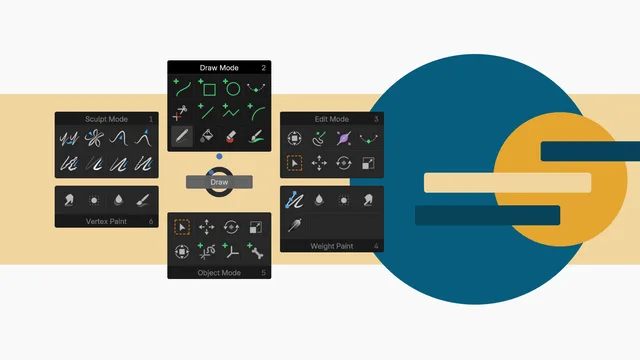
GP Tool Wheel is a free Blender add‑on that unifies Grease Pencil mode and tool selection into a single, customizable wheel, invoked by default with F8 and usable on any Blender version from 4.2 LTS onward.
Developed by SietseB.
About GP Tool Wheel
GP Tool Wheel is a Grease Pencil add‑on for Blender that combines mode and tool selection into one radial wheel. The wheel appears when an active Grease Pencil object is present and the cursor is in the 3D viewport. By default it opens with the F8 shortcut, which can be reassigned in the add‑on preferences. Users can customize the wheel order, displayed tools, and shortcut, and export these settings to a .json file for use on other machines. From Blender 4.3 onward the wheel integrates with the Brush Asset Shelf, allowing assignment of custom brushes to tools. The add‑on is free, released under GPL‑v3 or later, and requires Blender 4.2 LTS or newer.
Features
- Combines Grease Pencil mode and tool selection in a single wheel
- Invoked with the F8 shortcut by default, changeable in the add-on preferences
- Appears when an active Grease Pencil object exists and the cursor is in the 3D viewport
- Switch mode only by tapping 1 to 6 or clicking near the center dot
- Customizable wheel: shortcut, order of modes, and which tools appear
- Save and load wheel preferences to a .json file for other devices or installations
- Assign custom brushes from the Brush Asset Shelf to wheel tools (Blender 4.3 and higher)
Best for
Grease Pencil artists who need rapid switching between modes and tools and want a portable, customizable quick‑access interface.
Frequently asked questions
Which Blender versions does GP Tool Wheel support?
GP Tool Wheel is compatible with Blender 4.2 LTS and newer; it also works with earlier releases down to Blender 3.0 according to the developer, but official catalog support starts at 4.2.
How do I open the GP Tool Wheel?
The wheel opens with the F8 key by default; the shortcut can be changed in the add‑on preferences. It appears when a Grease Pencil object is active and the cursor is in the 3D viewport.
Can I move my GP Tool Wheel settings to another computer?
Yes. Settings can be saved to a .json file from the preferences and loaded on another computer or Blender installation, preserving shortcut, mode order, and tool selection.
Does GP Tool Wheel work with custom brushes?
The add‑on works with the Brush Asset Shelf introduced in Blender 4.3. Custom brushes can be assigned by right‑clicking a brush in the shelf and selecting Set as Tool in GP Tool Wheel.
Is GP Tool Wheel free?
The add‑on is listed as free and is released under the GNU GPL v3 or later. Licensing terms are subject to change, so review the developer’s repository for the latest information.
Related plugins
Explore GP Tool Wheel
View download and installation options.