
Immigration is a free After Effects plugin that streamlines importing and batch‑replacing files, showing file sequences as single items, preserving folder hierarchy, and offering customizable filters and an Auto‑Match Replace function.
Download aescripts + aeplugins Immigration ↗
Developed by aescripts + aeplugins.
About aescripts + aeplugins Immigration
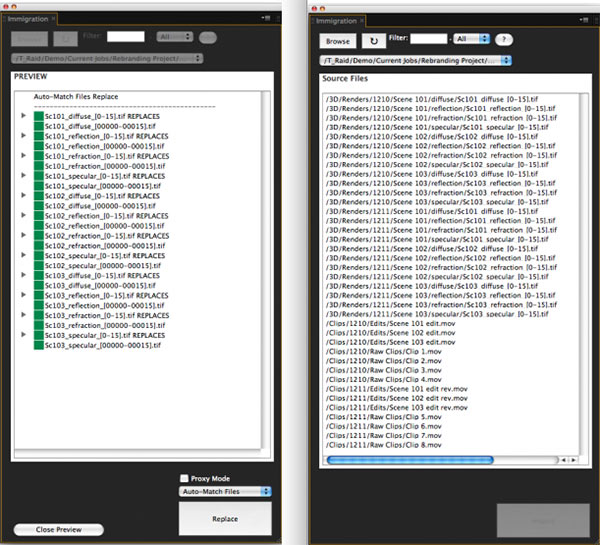
Immigration is a smart import and batch‑replace tool for Adobe After Effects, designed for handling file sequences and deeply nested folder structures. While browsing for import, it presents a sequence as a single line item rather than individual frames, and it uses a custom file‑system scanning algorithm that the developer reports significantly speeds up folder loading. Users can select multiple files or sequences to import at once or replace existing footage, assign a common frame rate, and rely on the Auto‑Match Replace feature, which automatically pairs similarly named files, shows a preview, and color‑codes matches by closeness. The plugin also duplicates the original folder hierarchy inside the project, and it allows filtering by file extension, file age, and inclusion or exclusion of specific folders by name. Compatibility spans Adobe After Effects CS6 through the 2025 release.
Features
- File sequences shown as a single line item while browsing for import, rather than a long list of individual frames
- Custom file-system scanning algorithm; the developer reports opening a 30,000-file server folder in twelve seconds, including file-sequence detection
- Select multiple files or sequences to import all at once or batch replace files already in the project
- Assign a frame rate to all imported files in a single step
- Auto-Match Replace matches similarly named files, previews the matches, and color codes each by closeness
- Duplicates and maintains folder hierarchy inside the After Effects project
- Filter by file extension and file age, and include or ignore folders by name
Best for
After Effects artists who need to import and batch replace large numbers of file sequences or work with complex, nested folder hierarchies.
Frequently asked questions
Does Immigration work with After Effects CS6?
Yes. Immigration supports After Effects CS6 and a wide range of later versions up to the 2025 release.
How does Immigration’s Auto-Match Replace algorithm work?
The Auto‑Match Replace algorithm automatically pairs files with similar names, displays a preview of each match, and color‑codes matches based on how closely the names align.
Can Immigration filter files by extension or age?
Yes. Immigration can be set to search for specific file extensions and limit results by file age, and it allows inclusion or exclusion of folders by name.
Is Immigration free to download?
The catalog lists Immigration as free, but pricing and licensing may change; check the developer’s site for the current terms before downloading.
Related plugins
Explore aescripts + aeplugins Immigration
View download and installation options.