
Parallax Node is a free Blender add‑on from MultLabs that provides a single shader node for parallax occlusion mapping, embedding the height map and offering step, strength, bias, and UV map controls for both Cycles and EEVEE.
Developed by MultLabs.
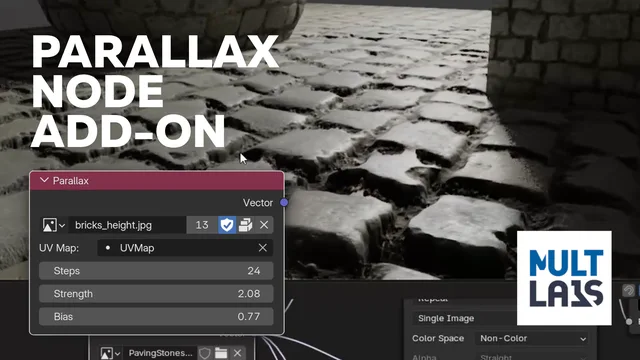
About Parallax Node
Parallax Node is a free add‑on for Blender 5.0 and newer that introduces a custom shader node for parallax occlusion mapping. The node contains the height‑map texture internally, removing the need for complex node groups. Users can select a UV map, set Steps from 1 to 64 to balance quality and performance, adjust Strength between 0.0 and 100.0, and fine‑tune Bias from 0.0 to 2.0. The node works in both Cycles and EEVEE render engines and includes a Camera Type setting with Default, Panoramic, and Mirror Ball modes. Version 1.1.3 adds these camera options, and the code builds on contributions from other GPL‑licensed projects. The add‑on is licensed under GPL v3.0 or later.
Features
- Single custom shader node that contains the Height Map texture directly, rather than a complex node group
- Steps parameter (1-64) for adjusting the iteration count, balancing quality against performance
- Strength control (0.0-100.0) for scaling the parallax effect
- Bias parameter (0.0-2.0) for fine-tuning the height mapping
- UV Map selector for use with custom UV layers
- Works with both Cycles and EEVEE
- Camera Type setting with Default, Panoramic, and Mirror Ball modes
Best for
Blender artists who need surface relief effects without adding geometry, using a compact node that works in both Cycles and EEVEE.
Frequently asked questions
Does Parallax Node work with Blender 5.0?
Yes. Parallax Node is listed as compatible with Blender 5.0 and newer, so it runs on current 5.x releases.
Does Parallax Node work with both Cycles and EEVEE?
Yes. The node works with both Cycles and EEVEE, allowing real‑time previews of the parallax effect in either engine.
How do I add the Parallax node in the Shader Editor?
In the Shader Editor, press Shift + A, navigate to the Parallax Nodes submenu, and select Parallax to add the node to your material.
Is Parallax Node free to download?
Parallax Node is provided free of charge and is released under the GNU GPL v3.0 or later.
What does the Steps parameter in Parallax Node control?
The Steps parameter controls the number of sampling iterations, ranging from 1 to 64; higher values improve quality but reduce performance.
Related plugins
Explore Parallax Node
View download and installation options.