
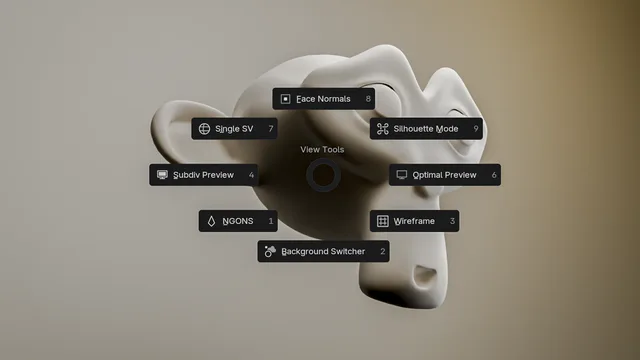
ViewTools is a free Blender add‑on by Ishara‑Sandeepa that consolidates viewport utilities for geometry inspection, including toggles for face normals, silhouette mode, wireframe, background presets, n‑gon/triangle detection, and subdivision management, all accessible via a single shortcut.
Developed by Ishara-Sandeepa.
About ViewTools
ViewTools is a viewport add‑on for Blender that streamlines common inspection tasks during modeling. It provides a Face Normals toggle, Silhouette Mode preview, and Wireframe view to examine topology, plus a Background Switcher with solid, white, black, default, or custom color presets. The N‑gons and Triangles check automatically finds and selects those faces, offering an optional zoom into problem areas. Subdivision Management lets users toggle subdivision modifiers on individual objects or all visible meshes. All tools are launched with the Alt + ` (accent grave) shortcut. The add‑on is compatible with Blender 4.3 and newer, released under the GNU General Public License v3.0 or later, and requires no special permissions to run.
Features
- Face Normals toggle for quickly inspecting face normals
- Silhouette Mode toggle for previewing models as silhouettes
- Wireframe toggle for inspecting topology
- Background Switcher with Solid, White, Black, Default, or custom color presets
- N-gons and Triangles check that detects and selects those faces, with an option to zoom into problem areas
- Subdivision Management that toggles subdivision modifiers for individual objects or all visible meshes
- Access to the tools via the Alt + ` (accent grave) shortcut
Best for
Modeling and topology optimization in Blender, where checking normals, wireframes, and n‑gons or triangles is part of the workflow.
Frequently asked questions
Does ViewTools work with Blender 4.3 and newer?
Yes. ViewTools lists compatibility with Blender 4.3 and newer, which is the minimum required version.
How do I activate ViewTools in Blender?
The add‑on is invoked with the Alt + ` (accent grave) shortcut, which opens its viewport tool panel.
What license does ViewTools use?
ViewTools is released under the GNU General Public License v3.0 or later, an open‑source license without purchase requirements.
Can ViewTools find n-gons and triangles in a mesh?
Yes. The N‑gons and Triangles check automatically detects and selects n‑gons and triangles, and can zoom to the identified areas.
Related plugins
Explore ViewTools
View download and installation options.