
Slides & Grids is a free After Effects plugin by Zohaib Malik that provides three tools for creating dynamic grids, managing precomps, and bulk‑editing compositions across projects.
Developed by Zohaib Malik.
About Slides & Grids
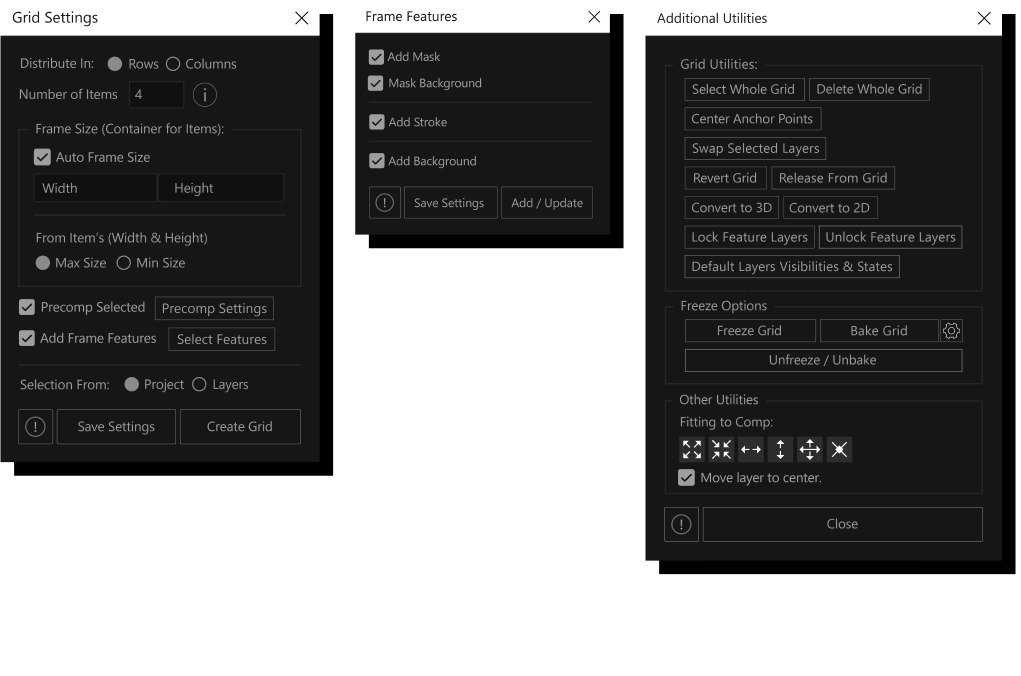
Slides & Grids is an After Effects extension that bundles three functional panels: a grid builder, a precomp creator/updater, and a bulk composition editor. The grid tool offers distribution, fitting, alternating offsets, progressive shifts, margin controls, zoom to specific items, frame sizing, masking, rounded corners, stroke dash settings, item backgrounds, and delayed or randomised transform animations. The precomp panel groups video, image, shape, or text layers with options for size, margin, fitting, duration, frame rate and pixel aspect ratio, and can update existing comps by adding, replacing, removing or toggling visibility of selected layers. The bulk editor applies similar layer changes across multiple compositions, targeting layers by selection, index or name. Version 1.3.2 runs on After Effects 2026 through 2020, consolidating grid creation, precomp handling and bulk editing in a single interface.
Features
- Grid creation with distribution and fitting, item fitting options, and alternating row or column offsets
- Progressive shift for rows and columns, adjustable item margins, and zoom of a specific item to comp
- Frame sizing, masks to clip items, roundness for frames and features, and stroke controls for dashes, gap and offset
- Item backgrounds plus animation with delays for transform properties and randomised grid animation
- Precomp multiple video, image, shape or text layers with size, margin, fitting, duration, frame rate and pixel aspect ratio options
- Bulk editing to add, replace, remove or change visibility across all selected compositions, targeting layers by selection, index or name
- Convert to Static Grid for manual editing, plus calculation support and width/height linking in the precomp dialog
Best for
After Effects artists who need to build grid layouts, generate precompositions, or apply bulk edits to multiple compositions quickly.
Frequently asked questions
Which After Effects versions does Slides & Grids support?
Slides & Grids is compatible with After Effects 2026, 2025, 2024, 2023, 2022, 2021 and 2020.
How do I show or hide the Slides & Grids panel?
The panel can be opened via the toggle button in the Properties panel toolbar, closed via the three‑line menu in the panel’s top‑right, or hidden through the Window menu.
Is Slides & Grids free to use?
The catalog lists Slides & Grids as free, but licensing terms may require activation; check the developer’s page for the current details.
What changed in Slides & Grids version 1.3.2?
Version 1.3.2 updated the licensing framework (v4.4.1), fixed online activation connection issues, adjusted panel sizes, refreshed default settings, and included minor bug fixes and performance improvements.
Related plugins
Explore Slides & Grids
View download and installation options.