
Cad_Dimensions is a free Blender add-on by Mr.Nobody3d that provides CAD‑style dimensioning with axis‑aligned tools, adjustable text, and a viewport mode mimicking ArchiCAD.
Developed by Mr.Nobody3d.
About Cad_Dimensions
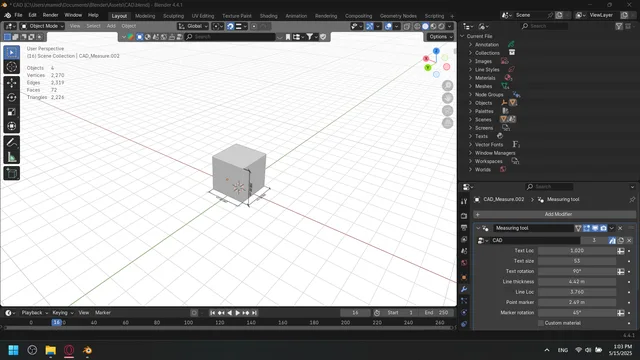
Cad_Dimensions is a Blender extension that adds a CAD‑like measuring system. It offers four buttons: a Cadify button that changes the viewport appearance to resemble ArchiCAD, and separate X, Y, and Z buttons that create dimension tools aligned to the respective axis. Users can adjust the text location, size, and orientation of dimensions. Version 2.0.0 improves the dimension tool, adds new measuring tools, and introduces a rudimentary conversion to imperial units. The add‑on is compatible with Blender 4.2 LTS and newer, requires no special permissions, and is released under the GNU General Public License v3.0 or later. Installation is performed by dragging the file into Blender or installing from disk.
Features
- Cadify button that changes the viewport look to mimic ArchiCAD
- X, Y and Z buttons that create a measuring tool aligned to the respective axis
- Adjustable text location, size and orientation for dimensions
- Rudimentary conversion to imperial units added in version 2.0.0
- Requires no special permissions to run in Blender
- Compatible with Blender 4.2 LTS and newer
Best for
Blender users who need CAD‑style axis‑aligned dimensions with customizable text.
Frequently asked questions
Does Cad_Dimensions work with Blender 4.2?
Yes. Cad_Dimensions is compatible with Blender 4.2 LTS and newer versions.
What license is Cad_Dimensions released under?
The add‑on is released under the GNU General Public License v3.0 or later.
What changed in Cad_Dimensions version 2.0.0?
Version 2.0.0 improves the existing dimension tool, adds new measuring tools, and adds a basic conversion to imperial units.
How do I install Cad_Dimensions in Blender?
Install by dragging the add‑on file into Blender or by using Blender’s “Install from Disk” option; no special permissions are required.
Related plugins
Explore Cad_Dimensions
View download and installation options.