
QuickMenu is a free Blender add‑on by QiuMu that provides quick‑access panels for adding objects and modifiers, setting origins, aligning cameras, and syncing render visibility, with support for Blender 4.2 LTS and newer.
Developed by QiuMu.
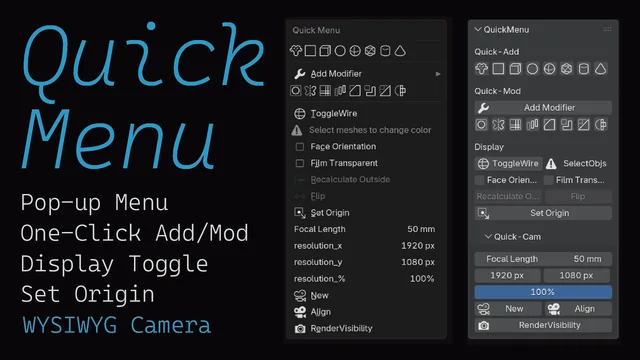
About QuickMenu
QuickMenu bundles several time‑saving panels into one Blender add‑on from QiuMu. The Quick‑Add panel offers eight buttons for common objects and modifiers, and newly added items inherit position and rotation from the 3D Cursor. Quick Origin Setup provides a shortcut to set an object’s origin in both Object and Edit modes. Quick‑Cam aligns the camera to the current view, copying focal length and resolution. A Render Visibility button synchronises the render visibility of all objects and modifiers with a single click. The Display panel controls wireframe settings, color, face orientation, film transparency, and normal flipping. The interface is localized into Simplified Chinese, Traditional Chinese, Japanese, Korean, and French. The add‑on is released under the GNU GPL v3.0 or later and requires no special permissions. Compatibility is listed for Blender 4.2 LTS and newer.
Features
- Quick-Add with 8 buttons for common objects and modifiers, alongside Quick-Mod
- Newly added objects align their position and rotation to the 3D Cursor
- Quick Origin Setup shortcut that works in both Object Mode and Edit Mode
- Quick-Cam adsorbs the camera to the current perspective, including focal length and resolution
- Render Visibility button syncs the rendering visibility of all objects and modifiers in one click
- Display panel for wireframe display and color, plus face orientation, film transparency, and reset flip normal
- Interface available in Simplified Chinese, Traditional Chinese, Japanese, Korean, and French
Best for
Blender artists who want faster workflows for creating objects and modifiers, setting origins, aligning cameras, and managing render visibility.
Frequently asked questions
Does QuickMenu work with Blender 4.2?
Yes. QuickMenu is listed as compatible with Blender 4.2 LTS and newer, so it should work with that version and later releases.
What license is QuickMenu released under?
QuickMenu is released under the GNU General Public License version 3.0 or later.
How do I install QuickMenu in Blender?
Install QuickMenu by downloading the add‑on file and using Blender’s “Install from Disk” option, or by dragging the file into Blender’s interface; then enable it in the Preferences.
Does QuickMenu require special permissions?
No special permissions are required; QuickMenu operates with the standard access granted to Blender extensions.
Related plugins
Explore QuickMenu
View download and installation options.