
Improved Node Search adds advanced text and regex queries to Blender’s node editors, allowing search by name, label, type, geometry attributes, and sockets. It highlights matches, flags problem nodes, and works via CTRL+F or the N‑Panel Tool panel.
Download Improved Node Search ↗
Developed by Griperis.
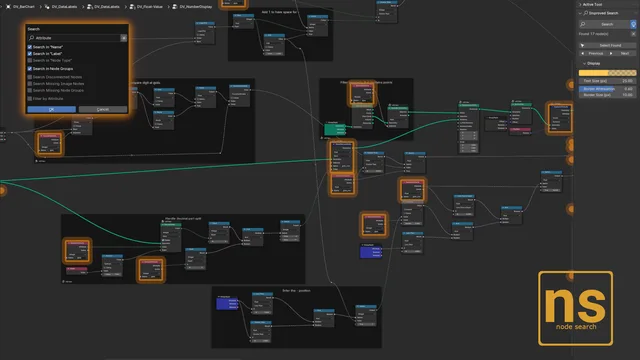
About Improved Node Search
Improved Node Search expands Blender’s node tree search with queries across node names, labels, and the blidname type property, plus optional regular expressions for precise matching. Version 1.0.5 adds socket search and a help popup. Geometry nodes can be searched by attribute, and the tool can identify disconnected nodes, missing images, and empty node groups. Matches are highlighted with on‑screen borders or off‑screen location circles, and occurrence counts appear in node groups. Users can select all found nodes or step through them with Select Found, Previous, and Next buttons. Highlight color, border attenuation, and text size are customizable, and the overlay can be toggled. The extension operates in Shader, Geometry, Compositor, and other node trees, opening via CTRL+F or the N‑Panel Tool panel.
Features
- Text search across node names, labels and the blidname type property, with a regular expression option
- Attribute search for geometry nodes
- Non-text searches for problem nodes: disconnected nodes, missing image nodes and missing node groups
- Navigation through matches with Select Found, Previous and Next buttons
- Highlighting via a border for on-screen nodes and a location circle for off-screen ones, with occurrence counts shown per node group
- Customizable Highlight Color, Border Attenuation and Text Size, plus an overlay toggle
- Works in Shader, Geometry, Compositor and other node trees
Best for
Blender artists who need to navigate complex node trees, locate specific nodes quickly, and detect problem nodes across Shader, Geometry, and Compositor editors.
Frequently asked questions
Does Improved Node Search work with Blender 4.2?
Yes. Improved Node Search is compatible with Blender 4.2 LTS and newer and runs inside all supported node editors.
How do I open Improved Node Search?
Press CTRL+F to open the tool, or locate it in the node tree sidebar (N‑Panel) under the Tool panel. Shortcuts can be reassigned in Blender Preferences.
Which node editors does Improved Node Search support?
The extension works in Shader, Geometry, Compositor, and any other node tree type in Blender.
Is Improved Node Search free to use?
The plugin is listed as free and is distributed under the GNU GPL v3.0 or later; no paid subscription is required.
Related plugins
Explore Improved Node Search
View download and installation options.