
Sculpt-Paint Wheel is a free Blender addon that adds on‑screen radial wheels for sculpt, paint, vertex paint, weight paint and Grease Pencil tools. It provides a Sculpt Wheel, Paint Wheel and Weight Wheel, with configurable hotkeys and shared settings across scenes.
Developed by jfmatheu.
About Sculpt-Paint Wheel
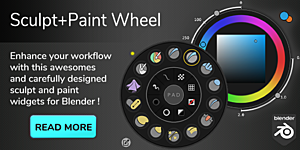
Sculpt-Paint Wheel introduces on‑screen wheel widgets to Blender’s sculpt and paint workflows. Three wheels are included: a Sculpt Wheel for Sculpt mode, a Paint Wheel for Texture Paint, Vertex Paint, Grease Pencil Draw and Vertex modes, and a Weight Wheel for Weight Paint and Grease Pencil Weight modes. The default trigger is the Space key, which can be re‑assigned, and the Paint Wheel can be set to stay open until toggled again. Custom button sets are saved and loaded, wheel panels appear in the 3D Viewport sidebar under the Sculpt and Paint tabs, and wheel data is unified across all scenes in a .blend file. Version 3.0.X supports Blender 3.6.5 and 4.0 and is recommended only for Blender 4.2 or lower; it does not support Blender 4.3 or newer and is not recommended for Apple Silicon Macs.
Features
- Sculpt Wheel triggered by holding Space in Sculpt mode, prefilled with default brushes and tools
- Paint Wheel for Texture Paint, Vertex Paint, Grease Pencil Draw and Grease Pencil Vertex modes
- Weight Wheel for Weight Paint and Grease Pencil Weight modes
- Configurable trigger key, defaulting to the spacebar, with an option to keep the Paint Wheel open until toggled
- Custom buttons and toolsets saved and loaded
- Wheel panels in the 3D Viewport sidebar under the Sculpt and Paint tabs
- Wheel data unified and shared across multiple scenes in the same .blend file
Best for
Blender artists using version 4.2 or earlier who want quick, radial access to brushes and tools in sculpt, paint, and weight modes.
Frequently asked questions
What Blender versions does Sculpt-Paint Wheel support?
Sculpt-Paint Wheel version 3.0.X works with Blender 3.6.5 and 4.0, and the developer recommends it for Blender 4.2 or lower; it does not support Blender 4.3 or newer.
Does Sculpt-Paint Wheel work on Apple Silicon Macs?
The addon is not recommended for Apple Silicon Macs, as users may encounter drawing artifacts, installation problems, or inability to use the wheel widgets.
How do I trigger the Sculpt Wheel or Paint Wheel in Blender?
Hold the configured trigger key (default Space) in the appropriate mode to display the Sculpt or Paint Wheel; release the key to dismiss. The Paint Wheel can optionally stay open until the hotkey is pressed again.
How do I update Sculpt-Paint Wheel safely?
To update safely, disable the addon in Blender’s preferences, remove it, restart Blender, then install the new version. Settings and custom buttons are retained across updates.
Is Sculpt-Paint Wheel free?
The catalog lists Sculpt-Paint Wheel as free, but licensing and availability may change; consult the developer’s page for the current terms before installing.
Related plugins
Explore Sculpt-Paint Wheel
View download and installation options.