
Grease Pencil to Curves is a free Blender add‑on by DadsCastle that converts Grease Pencil strokes into separate curve objects or hair curves, with smoothing, decimation and resampling options accessed from a single N‑Panel tab.
Download Grease Pencil to Curves ↗
Developed by DadsCastle.
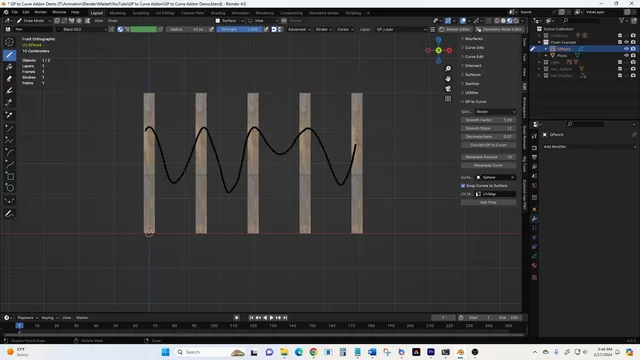
About Grease Pencil to Curves
Grease Pencil to Curves converts strokes drawn with Blender’s Grease Pencil into curve objects using a one‑click operation. Each Grease Pencil layer becomes an individual curve, and the add‑on’s interface resides in the N‑Panel under the “GP to Curves” tab. The tool can also attach the generated curve to a selected mesh surface as a hair curve, aligning it for quick grooming. Options include curve type selection, smoothing via the Grease Pencil Smooth modifier, vertex reduction with a Simplify modifier, and optional resampling to add points. Both smoothing and simplification are non‑destructive modifiers that must be applied before conversion. The add‑on requires Blender 4.3 or newer and is distributed under the GNU GPL v3 or later.
Features
- One-button conversion of Grease Pencil strokes into curve objects
- Each Grease Pencil layer creates a separate curve object
- One-click conversion of a resulting curve into a hair curve attached to a selected mesh surface, aligned to the surface
- Options for curve type, smoothing, and decimation
- Resample generated curves to increase points
- Button to invoke the Grease Pencil Smooth modifier and a Simplify modifier button for reducing spline vertices
- Add-on menu in the N-Panel “GP to Curves” tab
Best for
Blender users who need to turn hand‑drawn Grease Pencil strokes into clean curve geometry or hair‑curve setups, especially for grooming, geometry‑node pipelines, or base‑shape creation.
Frequently asked questions
Does Grease Pencil to Curves work with Blender 4.3 and newer?
Yes. Grease Pencil to Curves is compatible with Blender 4.3 and newer, including versions 4.5 and 5.01. Earlier Blender releases require older add‑on versions.
Do I need to apply the Smooth modifier before converting in Grease Pencil to Curves?
Yes. The Smooth (and Simplify) modifiers are non‑destructive, so they must be applied before converting the Grease Pencil strokes to curves.
Where does the Grease Pencil to Curves menu appear in Blender?
The add‑on adds a “GP to Curves” tab in Blender’s N‑Panel. All conversion and setting options are located there, not in the Object or Edit menus.
Can Grease Pencil to Curves make hair curves that snap to a mesh surface?
Yes. With a single click the add‑on can convert a curve into a hair curve that is attached and aligned to a selected mesh surface.
Is Grease Pencil to Curves free, and what license does it use?
The add‑on is free and released under the GNU General Public License version 3.0 or later. No special permissions are required to run it.
Related plugins
Explore Grease Pencil to Curves
View download and installation options.