
Maze any Mesh is a free Blender add‑on that applies a recursive backtracker algorithm to the selected portion of any mesh, creating maze paths with optional beveling, extrusion and 3D network support.
Developed by elfnorcat.
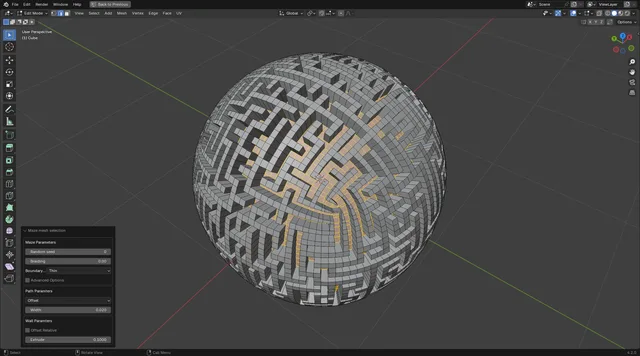
About Maze any Mesh
Maze any Mesh is a Blender add‑on from elfnorcat that treats a mesh’s vertices as cells and its edges as connections, then runs a recursive backtracker algorithm to carve a maze. After carving, the add‑on bevels the selected edges for path width and extrudes walls for height. Users can control randomness with a Seed parameter, adjust dead‑ends with a Braiding slider, and choose outer wall style (Thin, Thick, or None). Advanced options expose additional path and wall settings. The tool also works on pure vertex‑edge networks without faces, leaving the resulting edges selected for further shaping with modifiers such as Skin. It is accessible in Edit Mode via the Mesh menu or the F3 search. Compatibility requires Blender 4.2 LTS or newer.
Features
- Recursive backtracker maze algorithm run over the selected part of any mesh
- Random Seed parameter recalculates a different maze on the same selection
- Braiding slider controls dead ends; higher values give fewer dead ends and more loops or alternative paths
- Boundary Wall Type sets the outer wall to Thin, Thick or None when part of the mesh is selected or the mesh has a boundary
- Bevels the selected edges for path width and extrudes walls outward for height, with Advanced Options exposing extra Path and Wall parameters
- Runs on 3D networks of vertices and edges with no faces to produce 3D mazes
- Accessible in Edit Mode from the Mesh menu or through the F3 search
Best for
Blender artists who need to generate maze patterns directly on existing meshes or on 3D vertex‑edge networks.
Frequently asked questions
Does Maze any Mesh work with Blender 4.2?
Yes. Maze any Mesh is compatible with Blender 4.2 LTS and newer versions.
Where do I find Maze any Mesh in Blender after installing it?
After installation and enabling, the add‑on appears in Edit Mode under the Mesh menu and can also be launched via the F3 search by typing “maze”.
Can Maze any Mesh generate 3D mazes?
Yes. The add‑on can operate on 3D vertex‑edge networks without faces, producing a 3D maze whose edges remain selected for further processing.
How does Maze any Mesh handle large meshes?
Performance tests reported roughly five seconds to generate a maze on a mesh with about 10,000 vertices; width and height adjustments do not trigger a full path recomputation.
Is Maze any Mesh free to use?
The add‑on is free and released under the GNU General Public License v3.0 or later.
Related plugins
Explore Maze any Mesh
View download and installation options.