
FilmConvert Halation is a standalone plugin for After Effects, DaVinci Resolve and Premiere Pro that adds a red glow around bright parts of footage, mimicking the natural halation effect of film.
Download FilmConvert Halation (Standalone) ↗
Developed by FilmConvert.
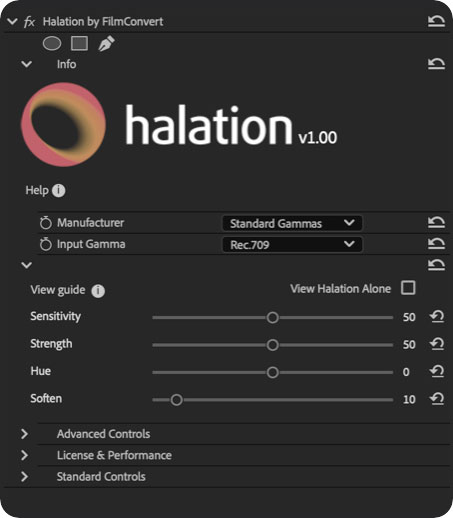
About FilmConvert Halation (Standalone)
FilmConvert Halation reproduces the red glow that appears around bright parts of an image when footage is shot on film. The effect is caused by light refracting off the film’s anti‑halation backing and back into the red channel, most commonly on bright sources such as lamps, car headlights and neon signs. The plugin can be used as a standalone effect in any workflow and is also offered as an add‑on to FilmConvert Nitrate. View Halation Alone controls let you preview where the effect is applied, and all parameters are fully adjustable. Compatibility includes Adobe CC 2018 and later, DaVinci Resolve 16 and later, and Final Cut Pro 10.6.1 and later. Supported operating systems are macOS 10.15+ (including Apple Silicon) and Windows 10 or 11.
Features
- Standalone plugin that can be used with any workflow, also available as an add-on to FilmConvert Nitrate
- Mimics where halation would naturally occur if shot on film
- View Halation Alone controls to see where halation is placed on your footage
- Fully customizable settings, from the defaults to your own adjustments
- Runs on macOS 10.15 and later, including Apple Silicon, and Windows 10 or 11
Best for
Editors and colorists who want to add a film‑style halation finish to projects in After Effects, DaVinci Resolve or Premiere Pro.
Frequently asked questions
Does FilmConvert Halation work with DaVinci Resolve and Premiere Pro?
Yes. FilmConvert Halation supports Adobe CC 2018 and later, which includes Premiere Pro and After Effects, as well as DaVinci Resolve 16 and later.
What are the system requirements for FilmConvert Halation?
The plugin runs on macOS 10.15 or newer (Apple Silicon supported, Intel Iris Pro not supported) and on Windows 10 or 11 with CUDA 10.1+ or OpenCL 1.1+. Final Cut Pro usage also requires macOS 11.5.1 or later.
Is FilmConvert Halation free?
The catalog lists FilmConvert Halation as free, but the developer notes that a watermarked trial is available and a paid license removes the watermark. Check the developer’s site for current licensing details.
Can FilmConvert Halation be used with FilmConvert Nitrate?
FilmConvert Halation can be used as a standalone plugin or as an add‑on to FilmConvert Nitrate, providing the same controls and customization in either mode.
Related plugins
Explore FilmConvert Halation (Standalone)
View download and installation options.