
Keyframe Tools is a free Blender add‑on by Hydrocallis that inserts, deletes and moves keyframes for rotation, scaling and movement, links objects or parameters to the active camera, and provides a simplified keymap panel with real‑time influence monitoring.
Developed by Hydrocallis.
About Keyframe Tools
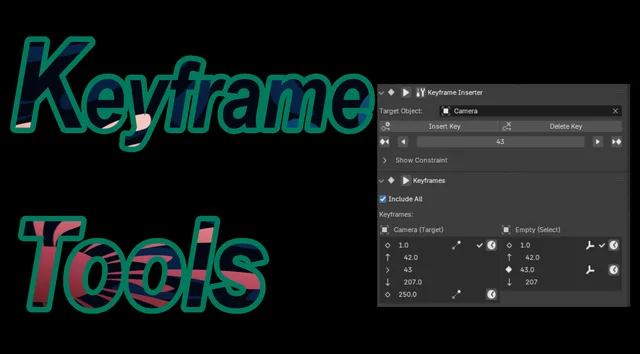
Keyframe Tools is a Blender extension (version 1.0.7) that lets users insert, delete and move keyframes for object rotation, scaling and translation. It is designed to link an object or other parameter to the active camera, making camera switches easier. The add‑on includes view‑locking for mouse‑driven camera movement, a compact keymap panel that keeps the timeline clearer, and displays track‑constraint influence values. A real‑time animation operator shows changes to those influence properties as they occur. Compatibility requires Blender 4.2 LTS or newer, and the software is released under the GNU GPL v3.0 or later.
Features
- Inserts, deletes, and moves keyframes for the rotation, scaling, and movement of specified objects at any location
- Built to link an object or another parameter with a camera, simplifying switching the camera between objects
- View locking to operate the camera with the mouse while moving it
- Simplified keymap display in the add-on panel for an easier-to-read timeline
- Track constraint feature keyframe influence values displayed in the panel
- Real-time animation operator for observing changes in influence property values
Best for
Blender animators who need streamlined control over object and camera keyframes, especially when tying objects or parameters to the current camera.
Frequently asked questions
Does Keyframe Tools work with Blender 4.2?
Yes. Keyframe Tools is compatible with Blender 4.2 LTS and any later Blender release.
How do I install Keyframe Tools in Blender?
Install it by dragging the downloaded extension file into Blender or by using the Extensions preferences to add the file from disk; no special permissions are required.
Can Keyframe Tools link a camera to an object in an animation?
The add‑on provides a feature to link an object or other parameter to the active camera, simplifying camera switching and allowing view‑locked mouse control while moving the camera.
What license is Keyframe Tools released under?
Keyframe Tools is distributed under the GNU General Public License version 3.0 or later (SPDX: GPL‑3.0‑or‑later).
Related plugins
Explore Keyframe Tools
View download and installation options.