
Keymesh is a free Blender add‑on that enables stop‑motion‑style animation by swapping object data between frames. It supports most object types, offers versioning, and includes tools for production workflows such as render‑farm baking and 3D‑printing export.
Developed by nickberckley.
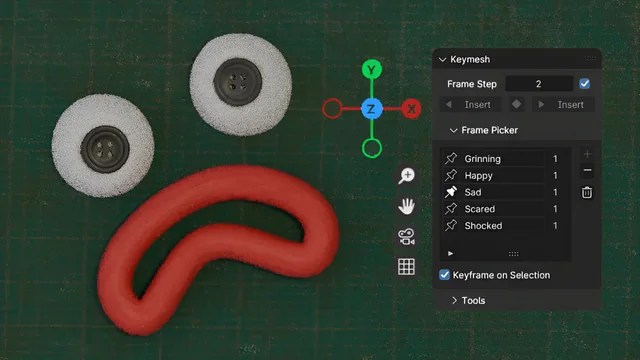
About Keymesh
Keymesh lets artists create stop‑motion‑like animations inside Blender by swapping mesh, curve, hair, volume, or text data between frames. A Frame Picker UI lists all saved object versions (blocks), lets users organize them, insert keyframes without duplicating entries, and view usage counts. The add‑on also functions as an object versioning tool, allowing multiple data versions to be placed on the timeline and scrubbed through. Production‑focused features include append, link, and library‑override support for a replacement‑parts workflow, a Convert to Separate Objects operator that bakes blocks into independent objects for render‑farm rendering, and a 3D‑printing operator that lines up each frame for export. Compatible with Blender 4.2 LTS and newer, Keymesh is released under the GNU GPL v3.0 or later.
Features
- Frame Picker UI that lists all object versions (blocks), lets you organize them and insert new keyframes without duplicating keyframes in the Dope Sheet, and shows how many times each block is used
- Object versioning that saves multiple versions of object data such as Mesh and Curve, which you can place on the timeline and scrub through
- Append, link, and library override support for a replacement parts workflow across object and scene files
- Render farm support through a Convert to Separate Objects operator that bakes each block into a separate object with animated visibility, without being destructive
- 3D printing replacement parts operator that creates a separate object for each animated frame, lines them up for export, and can delete duplicates
- Shape Keys to Keymesh operator that bakes shape key animations into Keymesh frames, removing the shape keys in the process
- Works on almost every type of object, including hair curves, volumes, text, and curves
Best for
Animators building stop‑motion‑style sequences in Blender and modelers or sculptors who need timeline‑based object versioning.
Frequently asked questions
Does Keymesh work with Blender 4.2?
Yes. Keymesh is listed as compatible with Blender 4.2 LTS and newer, so it runs on that release and later versions.
How do I append or link Keymesh objects into a scene file?
Keymesh objects can be appended or linked into a scene. Linked objects disable most operators except previewing, but you can create a library override, assign a local action, and place existing blocks on the timeline. Disable the Instance Object Data option when appending or linking.
Is Keymesh free to use?
Keymesh is free and released under the GNU General Public License v3.0 or later.
Can I use Keymesh animations on a render farm that doesn’t have it installed?
Yes. The Convert to Separate Objects operator bakes each Keymesh block into an independent object with animated visibility, allowing the animation to be rendered on farms without the add‑on installed.
Related plugins
Explore Keymesh
View download and installation options.