
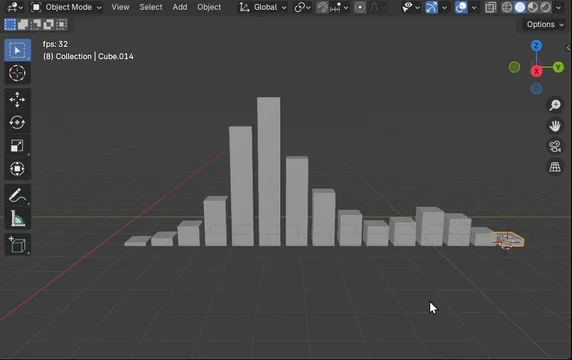
Simple Audio Visualizer is a free Blender add‑on by Polyfjord that creates animated cubes from an audio file or drives selected objects with audio spectrum data, accessed via a panel in the Graph Editor sidebar.
Download Simple Audio Visualizer ↗
Developed by Polyfjord.
About Simple Audio Visualizer
Simple Audio Visualizer is a Blender add‑on from Polyfjord that converts an audio file into animation. It offers two workflows: generating a set of animated cubes whose heights follow the audio spectrum, or animating user‑selected objects by applying the spectrum to chosen transform channels and axes. Both modes are controlled from a panel in the Graph Editor sidebar. Cube generation lets you set the number of cubes, an intensity multiplier, and enable Mirror Mode; cube heights respond to volume within exponential frequency sectors. When animating custom objects, you select them in the viewport, choose which channels (Location, Rotation, Scale) and axes to affect, and the add‑on distributes the spectrum across the objects alphabetically, with an Additive mode to layer animation over existing keyframes. Version 1.2.0 updates compatibility and stability for Blender 5.0 while preserving the existing UI and workflow. The add‑on is released under the GNU GPL v3.0 or later.
Features
- Generates animated cubes from a selected audio file
- Animates your own selected objects to the audio spectrum
- Cube height responds to volume within each frequency sector, using an exponential frequency curve
- Options for number of cubes, intensity multiplier, and Mirror Mode
- Choice of transform channels (Location, Rotation, Scale) and axes (X, Y, Z) when animating selected objects
- Additive mode adds animation on top of existing keyframes instead of replacing them
- Runs from a panel in the Graph Editor sidebar
Best for
Blender users who want to drive animation from an audio file, either as generated cubes or by animating their own objects.
Frequently asked questions
Does Simple Audio Visualizer work with Blender 5.0?
Yes. Simple Audio Visualizer is compatible with Blender 4.2 LTS and newer, and version 1.2.0 specifically updates the add‑on for Blender 5.0.
Where do I find Simple Audio Visualizer in Blender and how do I install it?
The add‑on appears as a panel named “Simple Audio Visualizer” in the Graph Editor sidebar. Install it by dragging the downloaded file into Blender or using the Install Add‑on option, then enable it in the Preferences.
Is Simple Audio Visualizer free?
The add‑on is listed as free and is distributed under the GNU GPL v3.0 or later, meaning it can be used and modified under those license terms.
Can Simple Audio Visualizer animate my own objects instead of cubes?
Yes. You can select any objects in the viewport, choose which transform channels and axes to affect, and the add‑on will animate those objects according to the audio spectrum, with optional additive mode.
Related plugins
Explore Simple Audio Visualizer
View download and installation options.