
Node Annotator is a free Blender add‑on that provides one‑click creation and editing of annotation frames with linked text blocks, plus tools to find and replace custom node group usages within node graphs.
Developed by FrankFirsching.
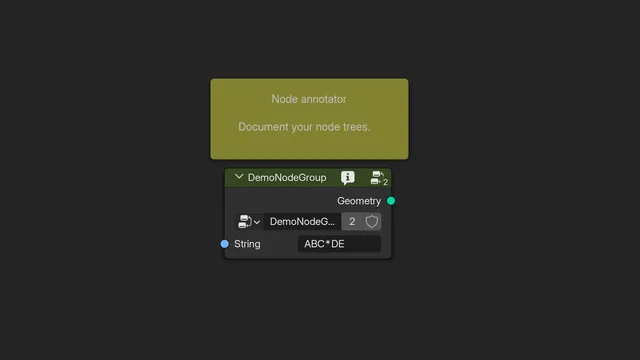
About Node Annotator
Node Annotator is a utility add‑on for Blender that streamlines documenting and maintaining node graphs. After installation it adds a “Node annotator” panel inside the Node tab of any graph editor. The panel offers one‑click creation of a yellow annotation box that automatically generates a text block and opens the text editor, as well as an edit function to modify existing annotations. A Description field links to the Blender 4.2 node‑group tooltip property and displays an info icon on node groups that have a description, which can be disabled in preferences. The refactoring tools let users search for specific custom node groups in the current tree, view each match, replace individually or replace all occurrences with a chosen alternative. The add‑on is released under the GNU GPL v3.0 or later.
Features
- Adds a “Node annotator” section within the Node tab on the side panel of any graph editor
- Create annotation places a yellow annotation box in the middle of the view, makes an associated text block, and opens a text editor window to enter the text
- Edit annotation opens a new window with the text editor for the selected annotation’s text
- Description field for the Blender 4.2 node group tool-tip property, with a small info icon painted into the header of node groups that have a description (can be disabled in preferences)
- Refactoring section finds usages of custom node groups in the current node tree using Search type and Replacement type dropdowns
- Search results list each match with buttons to replace it with the Replacement type or jump to that node
- Replace all refactors every occurrence of the search type to the replacement type
Best for
Documenting node graphs and refactoring custom node group usages in Blender.
Frequently asked questions
Does Node Annotator work with Blender 4.2 and later?
Yes. Node Annotator is listed as compatible with Blender 4.2 LTS and newer, and the latest version 0.4.3 includes bug fixes for Blender 5.1.
Where does Node Annotator add its controls in Blender?
It adds a “Node annotator” section inside the Node tab of the side panel in any graph editor, where all annotation and refactoring controls are located.
Does Node Annotator require special permissions?
No special permissions are required; the add‑on does not request additional access when installed in Blender.
How do I install Node Annotator, and is it free?
Node Annotator is free. It can be installed by downloading the file and using Blender’s “Install Add‑on from Disk” option or by dragging the file into Blender.
Related plugins
Explore Node Annotator
View download and installation options.