
RigFlex is a free Blender add‑on that adds simple, first‑order soft‑body motion to selected armature bones. After baking the effect across a keyframe range you can revert it, and it runs on Blender 4.2 LTS and newer without special permissions.
Developed by Nerk.
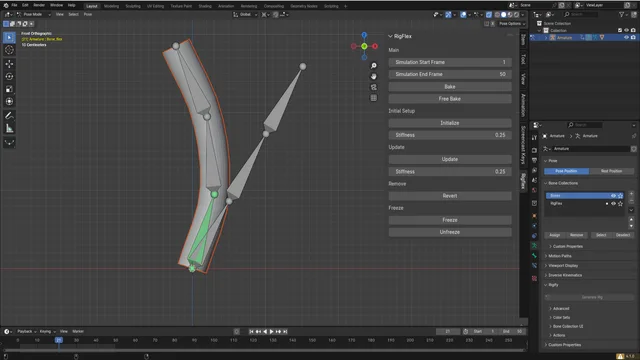
About RigFlex
RigFlex, developed by Nerk, provides a lightweight soft‑body simulation tailored for armature rigs in Blender. The add‑on runs a stable first‑order simulation that does not include collisions or overshoot, keeping the computation straightforward. Users select the deform bones and define a keyframe range, then click Bake to apply the soft‑body motion after the animation is completed. A Revert button removes the effect if needed. RigFlex is compatible with Blender 4.2 LTS and newer and requires no additional permissions. It is released under the GNU General Public License v2.0 or later, with source and issue tracking hosted on the developer’s GitHub repository.
Features
- Simple soft body actions applied to parts of an armature rig
- Stable, first order simulation with no collisions and no overshoot
- Bake soft body motion by selecting deform bones and a keyframe range
- Revert option to remove the effect after baking
- Compatible with Blender 4.2 LTS and newer
- Released under the GNU General Public License v2.0 or later
- Requires no special permissions
Best for
Blender riggers and animators who need a simple way to add and bake soft‑body motion onto specific bones without dealing with collision handling.
Frequently asked questions
Does RigFlex work with Blender 4.2 LTS and newer?
Yes. RigFlex is listed as compatible with Blender 4.2 LTS and newer; it should run on any Blender version from 4.2 LTS onward, though checking the developer’s GitHub for updates is advisable for very recent releases.
How do I apply and remove the soft body effect in RigFlex?
Select the deform bones and the keyframe range you wish to affect, then click Bake to apply the soft‑body motion. To remove the effect, use the Revert button, which restores the original animation data.
What license is RigFlex released under?
RigFlex is released under the GNU General Public License v2.0 or later, an open‑source license that permits use, modification, and redistribution under its terms.
How do I install RigFlex in Blender?
Download the add‑on zip, then install it in Blender via the Preferences → Add‑ons → Install… dialog or by dragging the file into the Blender window. No purchase is required.
Related plugins
Explore RigFlex
View download and installation options.