
Simple Bounce Curve is a free Blender add-on that draws a bounce curve between selected objects, with an adjustable height slider and editable control point handles, supporting dynamic height scaling in Blender 4.2 LTS and newer.
Download Simple Bounce Curve ↗
Developed by Polyfjord.
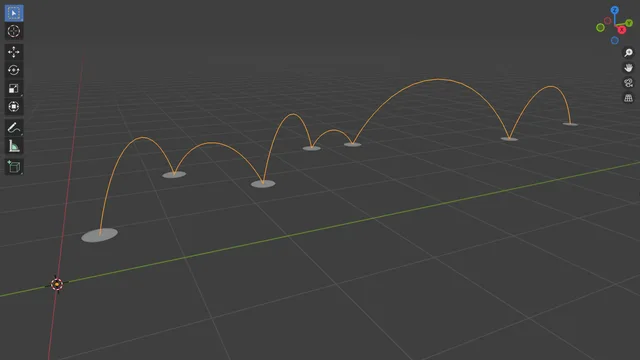
About Simple Bounce Curve
Simple Bounce Curve is a Blender add-on from Polyfjord that creates a single bounce curve connecting two or more selected objects based on their origins. After selecting the objects, use Object > Create Bounce Curve to generate the curve; its height can be adjusted via a slider in the redo panel, and the curve’s control point handles can be edited directly in Edit Mode. Version 1.1.0 added Dynamic Curve Height, which automatically scales the height according to the distance between objects, and set the default height factor to 0.1 m. The add-on also refines sharp control points to use zero‑length handles for more realistic curvature. It requires no special permissions, is licensed under the GNU GPL v3.0 or later, and is compatible with Blender 4.2 LTS and newer.
Features
- Creates a bounce curve connecting selected objects based on their origin
- Curve height adjustable with a slider in the operator’s redo panel
- Dynamic Curve Height scales based on the distance between selected objects
- Control point handles editable directly in Edit Mode
- Sharp control points use zero-length handles for more realistic curvature
- Requires no special permissions in Blender
Best for
Blender users who need a quick, adjustable bounce curve between multiple objects and want direct control over curve height and handles.
Frequently asked questions
Does Simple Bounce Curve work with Blender 4.2?
Yes. Simple Bounce Curve is compatible with Blender 4.2 LTS and any newer LTS or later releases.
How do I create a bounce curve with Simple Bounce Curve?
Select at least two objects in the 3D viewport, then choose Object > Create Bounce Curve. Adjust the Curve Height with the slider in the redo panel, and fine‑tune the curve by editing its control point handles in Edit Mode.
Is Simple Bounce Curve free to use?
The add-on is listed as free and is released under the GNU GPL v3.0 or later, allowing free use, modification, and redistribution.
What changed in Simple Bounce Curve version 1.1.0?
Version 1.1.0 introduced Dynamic Curve Height that scales with object distance, set the default height factor to 0.1 m, and updated sharp control points to use zero‑length handles for more realistic curvature.
Related plugins
Explore Simple Bounce Curve
View download and installation options.