
Context Pie is a free Blender add-on that replaces the standard context menu with a context‑sensitive pie menu, using three mouse shortcuts to access functions for modeling, curve editing, UV mapping, node editors and animation.
Developed by BastianLS.
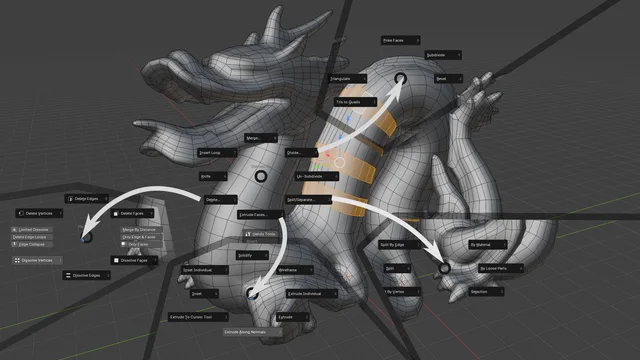
About Context Pie
Context Pie swaps Blender’s traditional context menu for a context‑sensitive pie menu, allowing many operations to share a single hotkey. It provides three mouse shortcuts: Right‑click opens a mode‑selection pie, Shift + Right‑click opens the context‑sensitive pie, and Ctrl + Right‑click opens pies for pivots and node links. The menus adapt to the current workspace, offering actions such as Merge in Edit mode, Join in Object mode, and Make Segment in Curve Edit mode. Version 0.9.51 adds experimental pie menus for the Shader, Geometry, and Compositor node editors, integrated with the Node Wrangler add‑on and featuring custom operators for Mix and Math nodes. All features respect Blender’s industry‑compatible keymap. The add‑on is released under GPL v3.0 or later and requires no special permissions. Compatibility: Blender 5.1 and newer.
Features
- Replaces the traditional context menu with a pie menu, enabling more functions on the same hotkey
- Three mouse shortcuts: Right Mouse for a mode selection pie, Shift + Right Mouse for the context-sensitive pie, and Ctrl + Right Mouse for pivots and node links
- Pie menus across poly modeling, curve editing, UV mapping, node editors and animation
- Context-aware top option: Merge in Edit mode, Join in Object mode, and Make Segment between selected points in Edit Curve mode
- Node editor pie menus across the Shader, Geometry and Compositor editors, integrated with the Node Wrangler core add-on
- Custom operators to change Mix and Math modes such as multiply, add and subtract
- Works with Blender’s industry compatible keymap
Best for
Blender artists who want faster, context‑aware access to modeling, curve, UV, node and animation tools via pie menus.
Frequently asked questions
Does Context Pie work with Blender 5.1?
Yes. Context Pie is compatible with Blender 5.1 and any newer version, as indicated for version 0.9.51.
What hotkeys does Context Pie use?
The add‑on defines three shortcuts: Right‑mouse opens a mode‑selection pie, Shift + Right‑mouse opens the context‑sensitive pie, and Ctrl + Right‑mouse opens pies for pivots and node links.
Is Context Pie free to use?
Context Pie is listed as free in the catalog and is distributed under the GNU GPL v3.0 or later license.
Does Context Pie support the node editors?
Version 0.9.51 adds pie menus for the Shader, Geometry, and Compositor node editors, integrated with Node Wrangler; these menus are experimental and can be disabled in the preferences.
Related plugins
Explore Context Pie
View download and installation options.