
Fit Lattice is a free Blender add-on that creates a lattice deformation cage around one or more meshes, offering orientation, subdivision, interpolation and edit‑mode workflow controls.
Developed by Mark Kingsnorth.
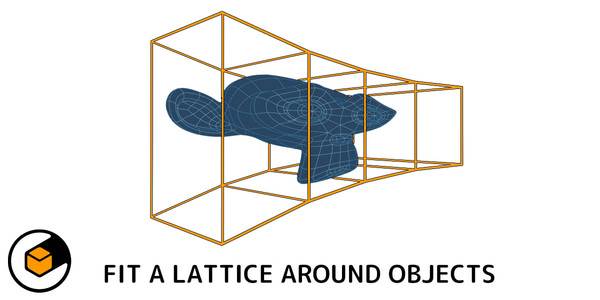
About Fit Lattice
Fit Lattice is a Blender add-on from Mark Kingsnorth that wraps a lattice deformation cage around selected meshes. It can align and resize the lattice at any rotation, shrinking to fit the minimum contour of objects that are not axis‑aligned. The tool operates directly in edit mode, allowing you to work on faces, edges, or vertices without leaving the modeling context. You can fit a single lattice to multiple meshes, choose built‑in subdivision presets (2×2×2, 3×3×3, 4×4×4) or define custom grid dimensions, and set interpolation to B‑Spline, Linear, or Catmull‑Rom. Mesh Deform mode, added in version 1.8.0, lets you use a mesh cage with Mesh Deform modifiers. One‑click options apply the deformation and remove the lattice, modifiers, and vertex groups when finished. The add‑on has been maintained for years and remains supported.
Features
- Aligns and resizes a lattice at any rotation, wrapping around objects that aren’t axis-aligned and shrinking to fit the minimum contour as you rotate
- Works in edit mode on selected faces, edges, or vertices without leaving edit mode
- One-click options to apply the lattice deformation and remove the lattice, modifiers, and vertex groups when finished
- Sets lattice interpolation to B-Spline, Linear, or Catmull-Rom in one go
- Fits a single lattice to multiple meshes at once
- Built-in subdivision presets such as 2×2×2, 3×3×3, and 4×4×4, or your own grid dimensions
- Mesh Deform mode fits a mesh cage instead of a lattice using Mesh Deform modifiers
Best for
Blender artists who need to fit lattice or mesh cages around one or more objects, including non‑axis‑aligned selections, while staying in edit mode.
Frequently asked questions
Does Fit Lattice work with Blender’s extensions system?
Yes, Fit Lattice is marked as compatible with Blender’s extensions system and works with supported Blender releases.
Can Fit Lattice be used while modeling in edit mode?
Yes, the add‑on functions in edit mode, allowing you to select faces, edges, or vertices and fit a lattice without leaving edit mode.
How do I apply the deform binding in Fit Lattice’s Mesh Deform mode?
In Mesh Deform mode, click the Bind button in the options panel that appears in the lower left of the viewport after running the add‑on; this activates the deformation binding.
What lattice subdivisions does Fit Lattice offer?
Fit Lattice includes preset subdivisions of 2×2×2, 3×3×3, and 4×4×4, and also allows you to specify custom grid dimensions.
Is Fit Lattice free?
The catalog lists Fit Lattice as free, but pricing and licensing may change; verify the current terms on the developer’s page before downloading.
Related plugins
Explore Fit Lattice
View download and installation options.