
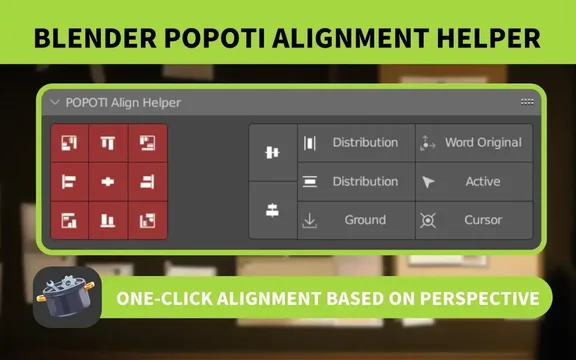
POPOTI Align Helper is a free Blender add‑on that aligns object position, rotation and scale from the current viewing perspective, offering distribution modes, ground‑align, and a drop‑to‑ground function, with shortcut keys for rapid workflow.
Download POPOTI Align Helper ↗
Developed by ACGGIT_LJ.
About POPOTI Align Helper
POPOTI Align Helper, version 1.2.7, adds observation‑perspective alignment to Blender 4.2 LTS and newer. It aligns objects’ position, rotation and scaling based on the viewport view, similar to Photoshop or PowerPoint alignment tools. Two distribution modes are provided: uniform spacing by origin or spacing, and a mode that keeps the first and last objects fixed while distributing the intervening objects. A ground‑align option can snap multiple objects to the ground individually or as a group, and a Fall function uses a global Z‑ray projection to drop objects onto others without physical simulation. Alignment targets include the world origin, active object, or cursor, with per‑axis control for maximum, center, or minimum values. Modifier keys speed the process—Ctrl + click aligns rotation, Shift + click aligns scale, Alt + click aligns position, and combinations are supported. The pie menu is opened with Ctrl + Alt + A. The add‑on is released under the GNU GPL v3.0 or later and requires no special permissions.
Features
- Perspective-based alignment of object position, rotation, and scaling
- Two distribution modes: uniform by origin or spacing, or fixed first and last objects with the middle ones distributed
- Ground align that snaps multiple objects individually or as a whole to the ground
- Fall function using global Z-ray projection to drop objects onto others, simulating a non-physical drop
- General alignment to the world origin, active object, or cursor, with per-axis maximum, center, or minimum control
- Modifier-key shortcuts: Ctrl for rotation, Shift for scale, Alt for position, combinable, plus a Ctrl+Alt+A align pie menu
Best for
Blender users who need precise alignment, distribution, and placement of objects from their viewing angle.
Frequently asked questions
Does POPOTI Align Helper work with Blender 4.2?
Yes. POPOTI Align Helper is compatible with Blender 4.2 LTS and newer versions.
How do I install POPOTI Align Helper?
The add‑on can be installed by dragging the file into Blender 4.2 or by using the standard install‑from‑disk procedure in Blender’s extensions preferences; the package is about 93 KB.
How do the modifier keys work in POPOTI Align Helper?
Ctrl + click aligns rotation, Shift + click aligns scale, Alt + click aligns position; these modifiers can be combined, and Ctrl + Alt + A opens the align pie menu.
What license is POPOTI Align Helper released under?
POPOTI Align Helper is released under the GNU General Public License version 3.0 or later.
Related plugins
Explore POPOTI Align Helper
View download and installation options.