
Snap Line Tool is a free Blender add-on that expands the built-in Snap controls with a line tool, accessible via View3D → TOOLS → Line Tool. It works with Blender 4.2 LTS and later.
Developed by mano-wii.
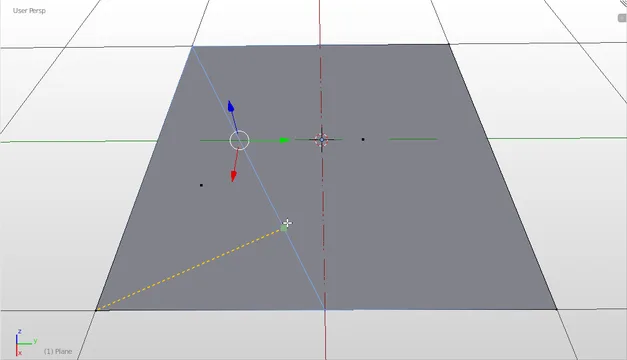
About Snap Line Tool
Snap Line Tool is a Blender add-on from developer mano-wii that extends Blender’s native Snap functionality. It appears in the Mesh category of the 3D Viewport and can be launched from View3D → TOOLS → Line Tool. Originally bundled with Blender 4.1, the add-on was renamed in version 6.8.1. It requires no special permissions and is distributed under the GNU General Public License v3.0 or later. Compatibility is listed for Blender 4.2 LTS and newer. Installation is performed by dragging the package into Blender or using the Install from Disk option. Documentation and licensing details are linked from the developer’s page.
Features
- Extends Blender’s built-in Snap controls
- Accessed from the 3D Viewport at View3D → TOOLS → Line Tool
- Falls under Blender’s Mesh category
- Compatible with Blender 4.2 LTS and newer
- Requires no special permissions
- Distributed under the GNU General Public License v3.0 or later
Best for
Blender users who need additional snap capabilities for mesh editing, particularly when working with line-based geometry placement.
Frequently asked questions
Does Snap Line Tool work with Blender 4.2?
Yes. The add-on lists compatibility with Blender 4.2 LTS and newer, indicating it is designed to run on that release and subsequent versions.
Where do I find Snap Line Tool in Blender?
After enabling the add-on, locate the tool in the 3D Viewport under View3D → TOOLS → Line Tool, within the Mesh category.
How do I install Snap Line Tool?
Install by dragging the downloaded package into an open Blender window or by choosing Install from Disk in the Preferences → Add‑ons panel; then enable the add-on.
What license does Snap Line Tool use?
Snap Line Tool is released under the GNU General Public License v3.0 or later, a free, open‑source license that permits use, modification, and redistribution under its terms.
Is Snap Line Tool free to use?
The catalog marks Snap Line Tool as free, and its GPL v3.0 license confirms it can be used without charge, though licensing terms should be reviewed for any updates.
Related plugins
Explore Snap Line Tool
View download and installation options.