
DMX (BlenderDMX) is a free, open‑source add‑on for Blender that visualizes and renders DMX lighting using GDTF device definitions. It supports Blender 4.2 LTS and newer, offers real‑time Eevee and ray‑traced Cycles output, and handles sACN, Art‑Net, OSC and PosiStageNet networking.
Developed by Sunova.
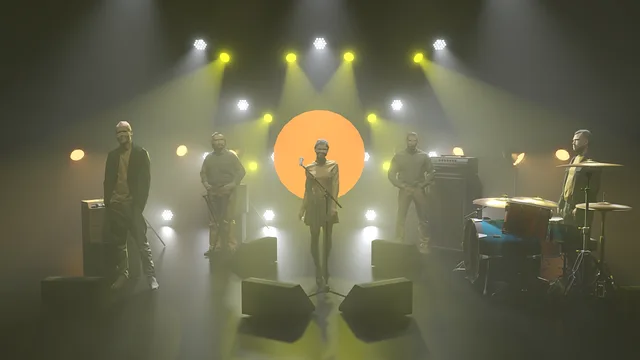
About DMX
DMX (also known as BlenderDMX) is a DMX lighting visualization and rendering add‑on that runs inside Blender. It uses the GDTF specification for fixture definitions, pulling data from the GDTF Share library and supporting static, moving, LED, laser, camera and truss devices. Rendering can be done with Eevee for real‑time dynamics or Cycles for photorealistic, ray‑traced results. An integrated programmer records keyframes manually or automatically, and external lighting consoles can control fixtures via sACN, Art‑Net, OpenSoundControl, PosiStageNet, or DMX over Network. Complete scenes—including fixtures, trusses, textures, addressing and unit numbers—can be imported or exported as MVR files through the Blender menu, drag‑and‑drop, or the MVR‑xchange protocol. The add‑on is released under the GPLv3 license and is free to use and modify.
Features
- GDTF device definitions drawn from the integrated GDTF Share fixture library, covering static and moving devices, LED bars, lasers, cameras and trusses
- MVR scene import and export carrying fixtures, trusses, 3D scene objects, textures, addressing, fixture IDs and unit numbers
- Eevee real-time rendering for dynamics and Cycles for photorealistic, ray-traced output
- Integrated programmer with manual or auto keyframe recording
- sACN and Art-Net input that can control fixtures, record as keyframes, or feed a #bdmx driver, plus remote programming over DMX over Network
- OpenSoundControl sends fixture selection to external DMX consoles, and PosiStageNet receives position data from trackers via a PSN server
- Import and export via the Blender menu, drag-and-drop, or the MVR-xchange protocol
Best for
Lighting designers who need to visualize, program, and render entertainment or architectural DMX setups directly within Blender.
Frequently asked questions
Does DMX work with Blender 4.2?
Yes. DMX supports Blender 4.2 LTS and any newer version; the developers note testing up to Blender 5.0. It requires at least Blender 4.2 LTS to install.
What lighting protocols and networking does DMX support?
DMX accepts external DMX signals via sACN and Art‑Net, supports OpenSoundControl for fixture selection, PosiStageNet for tracker position data, and remote programming through DMX over Network. MVR exchange uses the MVR‑xchange protocol.
How does DMX render lighting?
DMX uses Blender’s Eevee renderer for real‑time preview and dynamics, while Cycles provides photorealistic, ray‑traced output. The integrated programmer records keyframes either manually or with auto‑keyframing.
What can DMX import and export as MVR?
DMX can import and export full MVR (My Virtual Rig) scenes, including fixtures, trusses, 3D objects, textures, addressing data, fixture IDs and unit numbers. Operations are available via the Blender menu, drag‑and‑drop, or the MVR‑xchange protocol.
Is DMX free and what license does it use?
DMX is free and distributed under the GNU General Public License version 3 (GPLv3) or later. The source code is publicly available on GitHub.
Related plugins
Explore DMX
View download and installation options.