
Lumos is a free Blender add-on that adds pie menus, interactive operators and custom tools for placing and editing scene lights directly from the 3D View, aiming to speed up lighting workflows.
Developed by Eqkoss.
About Lumos
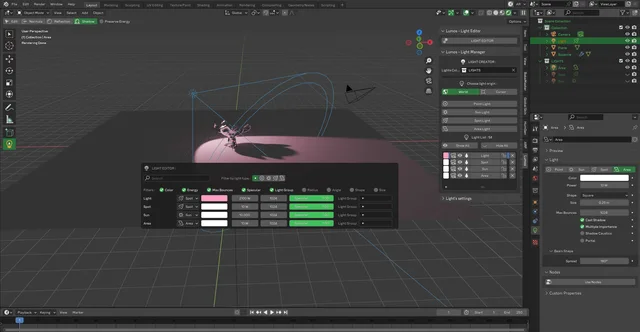
Lumos is a light editor and manager for Blender developed by Eqkoss. It introduces pie menus and shortcut‑driven panels in the 3D View to accelerate lighting tasks. The Light Panel Editor (CTRL + quote key) lists all lights and allows direct modification. The Light Manager in the N‑panel can create lights in a selected collection at the world or cursor position, and provides actions such as show/hide all, isolate, lock, look‑through and delete for a selected light. The Light Edit Tool offers an Edit Mode for adjusting energy, forward position, color, hue, value, and includes Normal, Reflection and Shadow placement modes. A Preserve Energy option keeps light intensity consistent regardless of distance. Lumos requires Blender 4.2 LTS or newer, needs no special permissions, and is released under the GNU GPL v3.0 or later.
Features
- Light Panel Editor (CTRL + quote key in the 3D View) that lists all lights in the scene and lets you modify them
- Light Manager in the N-panel to create lights in a chosen collection at the world or cursor position
- Selected-light actions including show or hide all, isolate, lock, look-through and delete
- Light Edit Tool Edit Mode for adjusting energy, forward position in the local Z axis, color, hue and value
- Normals, Reflection and Shadow modes that place a light interactively based on the surface normal, its reflection or the shadow it casts
- Preserve Energy option that keeps light intensity the same regardless of distance
Best for
Blender artists who need fast, interactive creation, management and placement of multiple lights without leaving the 3D View.
Frequently asked questions
Does Lumos work with Blender 4.2 and later?
Yes. Lumos is compatible with Blender 4.2 LTS and newer releases, including versions after 4.2.
How do I install Lumos in Blender?
Install Lumos by downloading the add‑on package and using Blender’s Preferences → Add‑ons → Install from Disk, then enable it. No special permissions are required.
What license is Lumos released under?
Lumos is released under the GNU General Public License version 3.0 or later, a free and open‑source license.
How do I open the Light Panel Editor in Lumos?
Open the Light Panel Editor by pressing CTRL plus the quote key (² on AZERTY keyboards) while in the 3D View.
Related plugins
Explore Lumos
View download and installation options.