
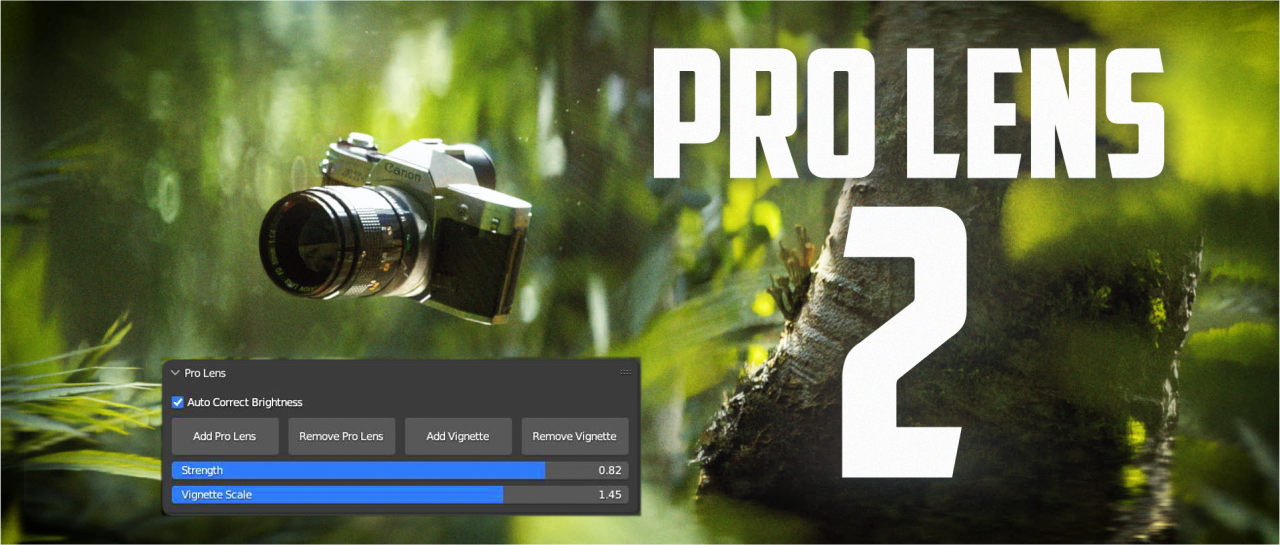
Pro Lens 2 is a rebuilt Blender add-on that adds lens effects, bokeh, and natural vignetting via controls in the Camera Properties panel, with sliders for strength and automatic brightness correction.
Developed by William Landgren.
About Pro Lens 2
Pro Lens 2 is a Blender add-on from William Landgren that provides lens effects, including bokeh and natural vignetting, through a revamped UI located in the Camera Properties panel. Users can add or remove the effect, adjust its strength with sliders, and enable auto‑brightness correction to prevent darkening. The add‑on allows focal length and aspect‑ratio changes while keeping lens elements aligned, and it is optimized for smoother operation than the original version. Supported Blender versions are 4.2, 4.0, and 3.0; a separate 2.1 build targets Blender 4.0 with additional fixes. For Blender versions below 4.0, the bokeh is tuned for an F‑stop of 2.8. Documentation and a demo video are included.
Features
- Buttons and panels in the Camera Properties to add or remove the effect
- Slider-based adjustment of effect strength
- Natural vignetting option
- Focal length and ratio adjustment while keeping lens elements lined up
- Auto brightness correction to keep the image from getting dark
- Bokeh designed around an F-stop of 2.8
- Documentation included
Best for
Blender artists who need customizable lens effects, bokeh, and vignetting integrated directly into camera settings.
Frequently asked questions
Which Blender versions does Pro Lens 2 support?
Pro Lens 2 supports Blender 4.2, 4.0, and 3.0. A separate 2.1 build is provided for Blender 4.0 with additional improvements.
Is Pro Lens 2 free to use?
The catalog lists Pro Lens 2 as free, but users should verify the current license on the developer’s page before relying on it for a project.
What F-stop should I use with Pro Lens 2?
For versions below Blender 4.0, the add‑on is designed around an F‑stop of 2.8 to produce the intended bokeh quality.
Is there a demo video for Pro Lens 2?
A demo video for Pro Lens 2 is available on YouTube, and the catalog also references accompanying documentation.
Related plugins
Explore Pro Lens 2
View download and installation options.