
Flowify is a free Blender add‑on that bends a source mesh onto a gridded surface or an open cylinder, using a flat reference grid and preserving materials while updating automatically with source or target edits.
Developed by Mark Kingsnorth.
About Flowify
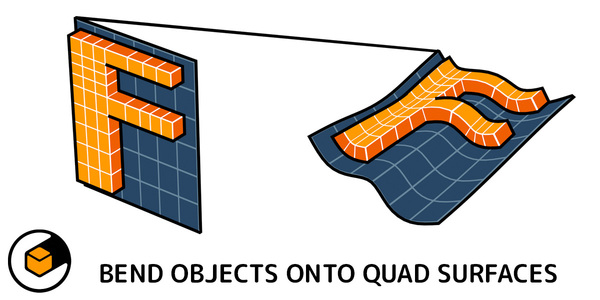
Flowify is a Blender add‑on for 3D modelers that bends a source object onto a target surface. The target may be a surface composed of evenly spaced four‑sided faces with four corners, or an open cylinder. A flat reference grid guides the deformation, allowing complex wraps that would be difficult to model manually. The workflow involves three objects: the source mesh, a flat source grid, and the target surface. After selecting the source, Flowify is run from the right‑click menu and a matching corner is chosen to generate the result. The add‑on updates the deformation automatically when either the source or target is edited, copies materials, and offers a configurable modifier. It works with regular meshes, instanced objects, and text that have deformable topology. Deformation quality depends on the source mesh’s vertex density. Version 1.1 added cylindrical surface support.
Features
- Bends a source object onto a four-sided, four-cornered surface or an open cylinder, guided by a flat reference grid
- Automatically updates the result when you edit either the Source Object or the Target Surface
- Copies materials from the source object over to the result
- Works on regular objects, instanced objects and text with deformable topology
- Lets you configure a Flowify modifier with additional options after generating the result
- Optional use in Blender’s Quad View mode
Best for
3D modelers who need to wrap detailed meshes onto a gridded planar surface or an open cylindrical surface within Blender.
Frequently asked questions
Does Flowify work with cylindrical surfaces?
Yes. Flowify supports both flat, grid‑based surfaces and open cylindrical surfaces; cylindrical support was added in version 1.1.
How do I apply Flowify to a Source Object in Blender?
Create three objects—a source mesh, a flat source grid, and a target surface—select the source mesh, run Flowify from Blender’s right‑click menu, and choose a matching corner between the grid and target to generate the deformation.
Can Flowify deform text and instanced objects?
Flowify can deform regular meshes, instanced objects, and text, provided they have sufficient, deformable topology for the mesh‑based bending process.
Why does my Flowify result deform poorly?
Poor deformation usually indicates the source mesh lacks enough vertices or faces; increasing the mesh’s resolution improves the quality of the bend.
Is Flowify free?
The catalog lists Flowify as free, but licensing terms may change; verify current pricing on the developer’s page before downloading.
Related plugins
Explore Flowify
View download and installation options.