
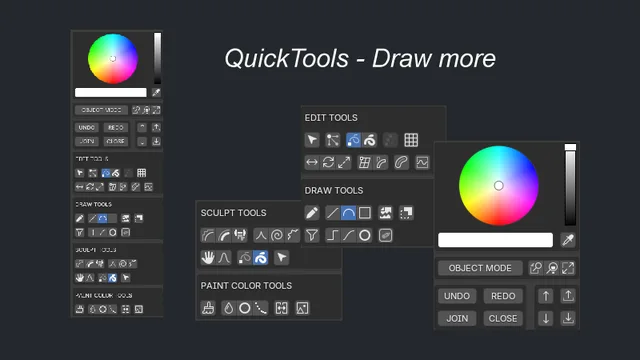
Grease Pencil QuickTools is a free Blender add‑on that places frequently used Grease Pencil operators in the N sidebar, automatically switches to the appropriate mode, and unifies brush colors for quicker workflow.
Download Grease Pencil QuickTools_ ↗
Developed by PongBuster.
About Grease Pencil QuickTools_
Grease Pencil QuickTools adds a panel to Blender’s N sidebar that gathers common Grease Pencil operators. Selecting a tool automatically changes to the correct mode and applies a unified brush color scheme. Included tools cover QuickTaper (thickness tapering with SHIFT/CTRL modifiers), QuickAlign (horizontal/vertical alignment), QuickText (adds styled text strokes via a gptext_maker.blend file), Interpolate Stroke (interpolates position, color, opacity, thickness), Snapigon (draws polygons that snap points), Quick Stroke Settings (adjusts hardness, opacity, radius, fill opacity and rotation with mouse‑wheel and modifiers), SubMerge (subdivide/merge by distance), as well as Knife, Color Picker, Select Linked and Set Fill Color. Compatibility is listed for Blender 4.3 and newer; version 1.1.7 adds text fonts for Blender 5, improves color matching, and fixes bugs. The add‑on is released under the GNU GPL v3.0 or later and requires no special permissions.
Features
- N sidebar panel that groups frequently used Grease Pencil tools, with automatic mode switching and unified brush colors
- QuickTaper tapers point thickness on selected strokes (SHIFT to taper in only, CTRL to taper out only)
- QuickText adds text as strokes in provided styles, with custom styles built via a gptext_maker.blend file
- Interpolate Stroke interpolates position, colors, opacity and thickness between keyframes
- Quick Stroke Settings adjusts hardness, opacity, radius, fill opacity and rotation via mouse-wheel and modifier keys
- Snapigon draws polygons that snap points to others on the current frame
- Color Picker samples fill and stroke vertex colors and point radius
Best for
Blender artists who work with Grease Pencil and want rapid access to common tools via a single N‑sidebar panel with automatic mode switching.
Frequently asked questions
Does Grease Pencil QuickTools work with Blender 4.3?
Yes. Grease Pencil QuickTools is compatible with Blender 4.3 and any newer version.
How does Quick Stroke Settings adjust strokes in Grease Pencil QuickTools?
Quick Stroke Settings changes selected stroke properties using the mouse wheel combined with modifiers: wheel alone adjusts hardness, SHIFT + wheel adjusts opacity, CTRL + wheel adjusts radius, SHIFT + CTRL + wheel adjusts fill opacity, and ALT + wheel adjusts rotation.
What changed in Grease Pencil QuickTools version 1.1.7?
Version 1.1.7 added text fonts for Blender 5, improved brush‑color matching, and included several compatibility bug fixes.
How do I create custom text styles in Grease Pencil QuickTools?
Custom text styles are created by editing the gptext_maker.blend file referenced by the add‑on; these styles are then available through the QuickText tool in the N sidebar.
Is Grease Pencil QuickTools free to use?
The add‑on is free; it is released under the GNU GPL v3.0 or later, allowing use, modification and redistribution without cost.
Related plugins
Explore Grease Pencil QuickTools_
View download and installation options.