
Auto-tracking is a free Blender add-on by mcd1992 that provides a toolbar in the Movie Clip Editor to automatically detect features and track forward, targeting footage without built‑in tracking markers.
Developed by mcd1992.
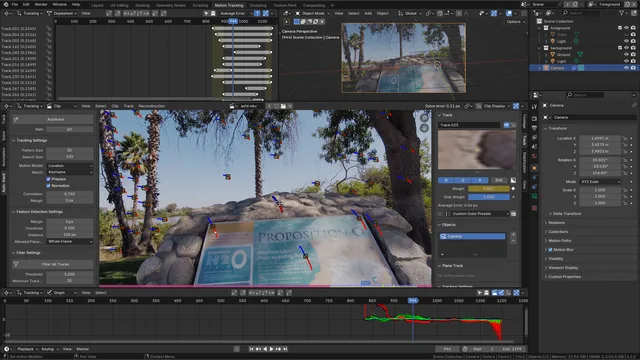
About Auto-tracking
Auto-tracking is a Blender add-on developed by mcd1992 that streamlines VFX motion tracking. The extension installs a toolbar in the tracking viewport, automating the detect‑features step and subsequent forward tracking, eliminating the need to place points manually. It is intended for footage captured without tracking markers. After generating tracks, users can employ Blender’s native tools or other add‑ons to clean up and reweight poor tracks. The add‑on appears in the Movie Clip Editor under Tracking > Clip > Toolbar. Released as version 1.0.0, it is compatible with Blender 4.2 LTS and newer and is licensed under the GNU GPL v2.0 or later. The package is approximately 3.5 KB and requires no special permissions.
Features
- Adds a toolbar in the tracking viewport
- Automates running detect features and then tracking forward
- Aimed at footage with no tracking markers in the scene
- Works alongside Blender’s built-in tools or other extensions to remove and reweight bad tracks
- Located in the Movie Clip Editor under Tracking > Clip > Toolbar
- Compatible with Blender 4.2 LTS and newer
- Requires no special permissions
Best for
Artists working with footage that lacks dedicated tracking markers and who need an automated way to generate initial tracks within Blender.
Frequently asked questions
Does Auto-tracking work with Blender 4.2?
Yes. Auto-tracking lists compatibility with Blender 4.2 LTS and newer, so it works with the 4.2 long‑term support release and later versions.
Where do I find Auto-tracking in Blender after installing it?
After installation, the Auto‑tracking toolbar is located in the Movie Clip Editor under Tracking > Clip > Toolbar.
What license is Auto-tracking released under?
Auto‑tracking is released under the GNU General Public License v2.0 or later.
Does Auto-tracking require any special permissions?
No special permissions are required to install or run Auto‑tracking.
Related plugins
Explore Auto-tracking
View download and installation options.